MTSS in Descant: Tiered Support Documentation for Australian Schools
Published 6 min read
Document student support across MTSS tiers — universal (Tier 1), targeted (Tier 2), and intensive (Tier 3) — with structured referral tracking, intervention documentation, and a dated tier history that sits alongside support plans, NCCD evidence and SSG meeting workflows.
- School Counsellors
- School Psychologists
- Wellbeing Officers
- Teachers
- Education
On this page
Summary
Descant now includes a Multi-Tiered System of Supports (MTSS) framework. Each student referral can be given a support tier — universal (Tier 1), targeted (Tier 2), or intensive (Tier 3) — and the tier flows through to referral tracking, SSG meeting agendas, the student handover and the leadership briefing on the Reports page. The framework provides structure without rigidity — schools can use it as lightly or deeply as their model requires.
What MTSS Means for Documentation
Multi-Tiered Systems of Support (MTSS) is a framework used in Australian schools to organise student support into levels of intensity:
Tier 1 — Universal: Support available to all students. Classroom-wide strategies, whole-school wellbeing programs, and universal screening. Most students thrive with Tier 1 support alone.
Tier 2 — Targeted: Small-group or short-term individual support for students who need more than universal strategies. Examples include social skills groups, targeted literacy support, or short-term counselling for a specific concern.
Tier 3 — Intensive: Individualised, sustained support for students with complex or persistent needs. This typically involves individual counselling, specialist referrals, multi-agency involvement, and formal plans (IEPs, behaviour support plans).
The value of MTSS as a documentation framework is that it structures the conversation about intensity of support. When a referral enters the system, the team assigns a tier based on the level of support the student currently receives. As the student's needs change, the tier moves — and the documentation reflects that movement.
How MTSS Works in the Platform
Tier Assignment on Every Referral
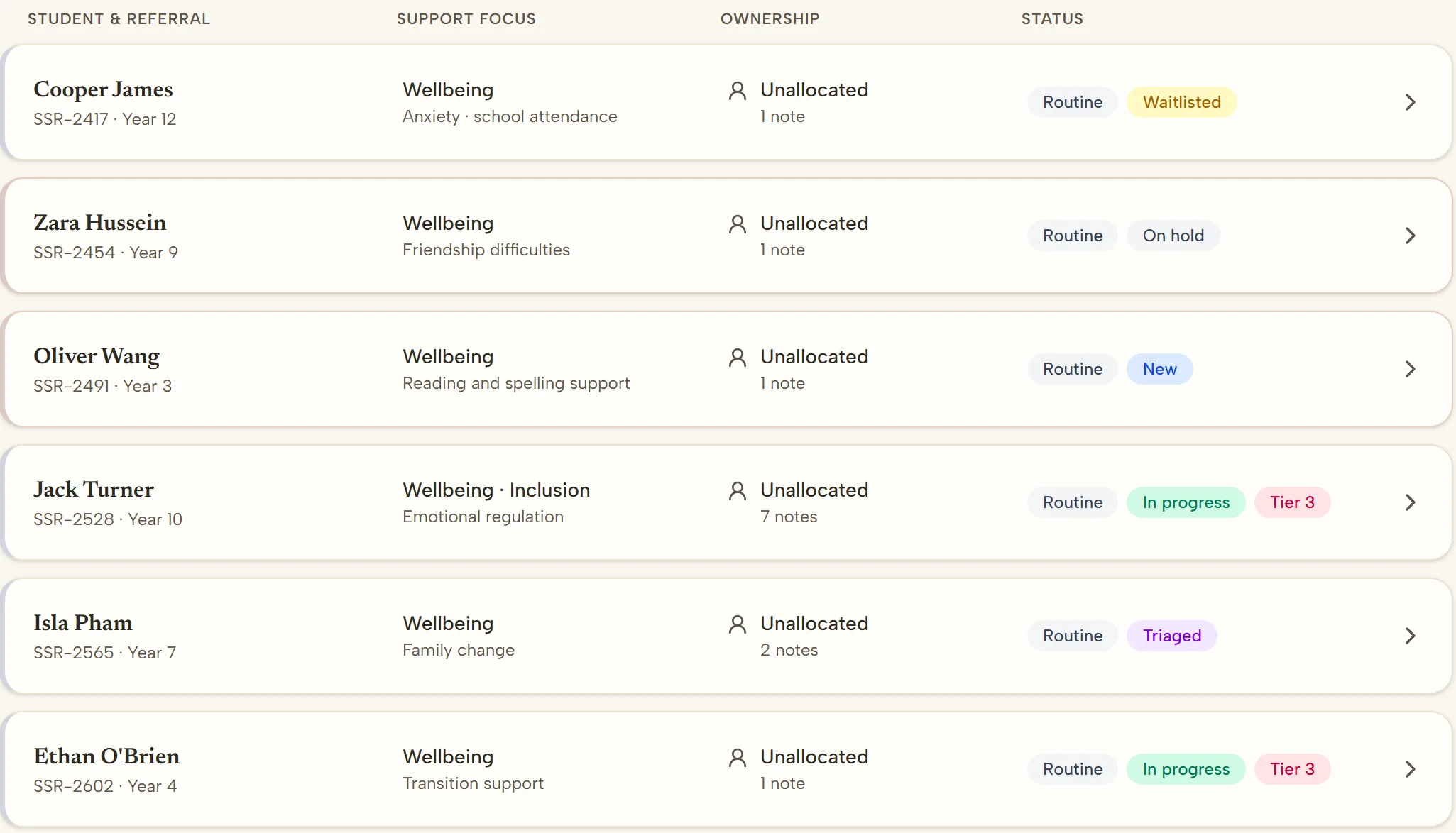
When a referral is created — whether by a teacher or wellbeing officer in the educator portal, or by a parent, carer or student through the school's secure referral form — the triaging staff member assigns a support tier. This is a simple selection: Tier 1, Tier 2, or Tier 3. Referrals can also be left unassigned if the appropriate tier is not yet clear.
The tier appears in the referrals list, on the case, in generated meeting agendas and in the student handover. It provides immediate context about the intensity of support being considered.
Tier Movement
Students do not stay at the same tier permanently. A student who begins with Tier 2 targeted support may improve and step down to Tier 1, or their needs may escalate to Tier 3. The platform keeps a dated history of tier changes, with the reason recorded for each change, creating a record of how support intensity has changed over time.
Tier movement is a clinical decision made by the wellbeing team — the platform records the decision, it does not recommend it.
Connection to NCCD
The NCCD framework requires schools to document the level of adjustment provided to students with disability. While MTSS tiers and NCCD adjustment levels are not identical, they are closely related:
- Tier 1 aligns broadly with Quality Differentiated Teaching Practice (QDTP)
- Tier 2 aligns broadly with Supplementary adjustments
- Tier 3 aligns broadly with Substantial or Extensive adjustments
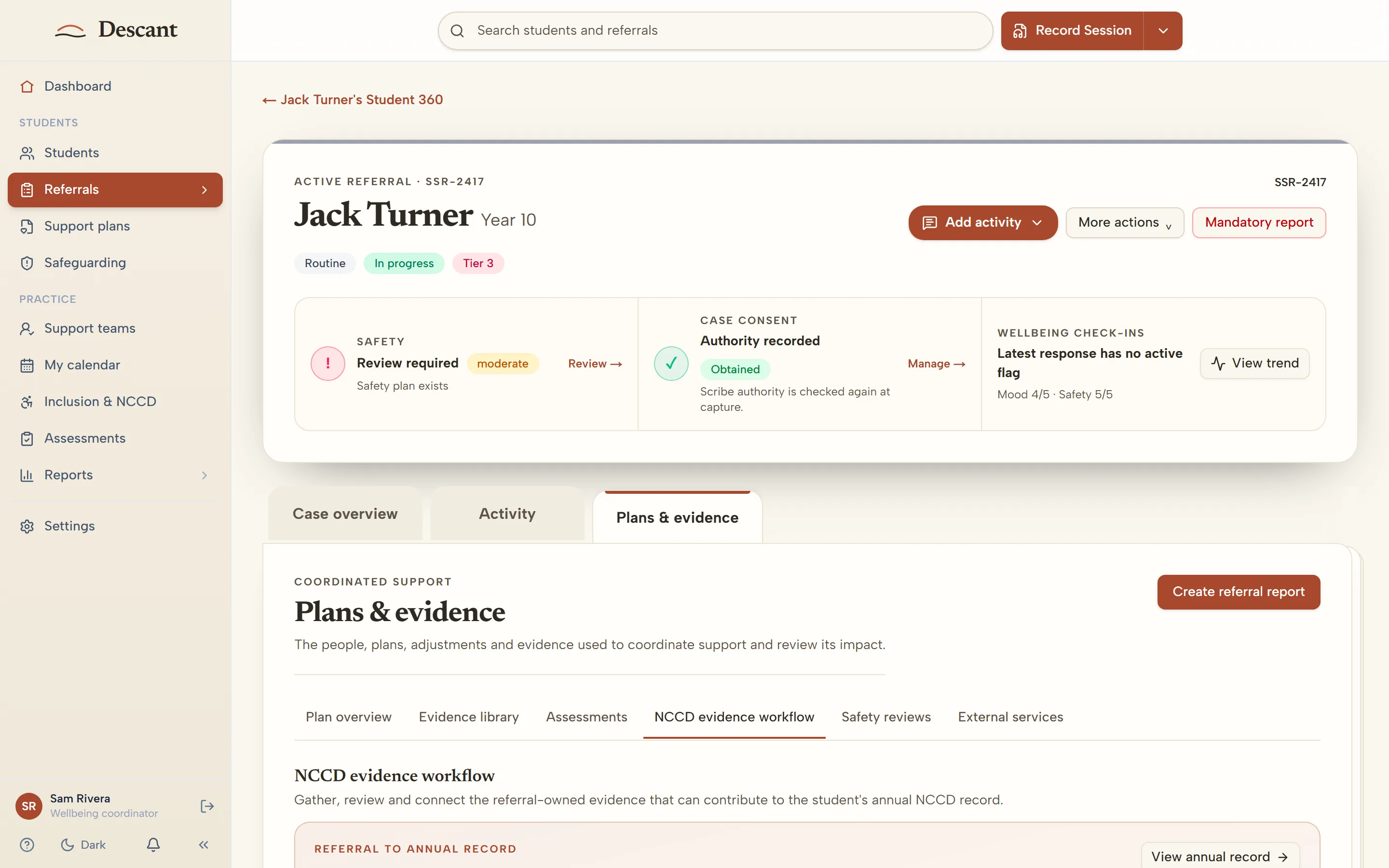
When the tier on the student's case sits alongside the NCCD category and level recorded on their support plan, the school builds a coherent evidence base that connects the intensity of support (MTSS) with the disability adjustment framework (NCCD).
Integration with SSG Meetings
When you generate an SSG meeting agenda from the student's case, it includes the student's current support tier as context. When the team reviews a student's progress, the tier provides a quick reference for where the student sits in the support framework. If the team decides to change the tier — escalate or de-escalate — the change is recorded in the tier history on the referral.
Leadership Analytics
The leadership briefing on the Reports page includes MTSS tier distribution. School leaders can see:
- How many students are at each tier
- The balance between universal, targeted, and intensive support
- Whether Tier 3 numbers are growing (which may indicate a need for stronger Tier 1 and Tier 2 strategies)
These figures help leadership teams make resourcing decisions — if 40% of referrals are at Tier 3, the school may need to invest in preventative programs at Tiers 1 and 2.
For Schools Already Using MTSS
If your school already uses an MTSS or Response to Intervention (RTI) framework, the platform's tier system maps directly to your existing model. The tier labels (1, 2, 3) are consistent with Australian and international MTSS terminology.
The benefit of documenting MTSS tiers inside the same platform where referrals, case notes, IEPs, and SSG meetings live is that the tier is not an isolated label — it is connected to the full support record. When you review a Tier 3 student, you see the referrals, interventions, meetings and assessments on their record alongside the tier.
For Schools New to MTSS
If your school does not currently use a formal MTSS framework, the tier system provides a low-friction starting point. Assigning a tier to each referral is a single selection at triage and immediately adds a layer of structure to your support data.
You do not need to implement a full MTSS model to benefit from tier tracking. Even basic tier assignment creates useful data — leadership can see the intensity distribution of support needs across the school, which informs staffing and program decisions.
Getting Started
MTSS tier assignment is available on all student referrals in the Student Support Platform. When triaging a referral, select the appropriate tier from the dropdown. The tier then appears in SSG meeting agendas and in the tier distribution on the Reports page.
Visit For Schools to learn more, or get in touch for a walkthrough.
The MTSS framework in Descant is a documentation and tracking tool. All decisions about student support intensity, tier assignment, and intervention are made by the professionals involved in the student's care.