Student Support Platform for Australian Schools: Referrals, Case Notes, and NCCD Tracking in One System
Published 9 min read
Australian schools juggle referrals, case notes, consent forms, and NCCD evidence across spreadsheets, paper forms, and disconnected systems. Here's how a purpose-built student support platform brings it all together for counsellors, psychologists, wellbeing officers, and school leadership.
- School Counsellors
- School Psychologists
- Teachers
- Wellbeing Officers
- Education
On this page
- The Coordination Problem
- Referral Areas of Support
- Referral Triage and Suggested Allocation
- Digital Parent Consent Workflows
- NCCD Evidence Collection Built Into the Workflow
- Mandatory Reporting Records and Follow-Up Tracking
- SST Meeting Coordination
- Referrals from Staff, Families and Students
- Student Check-Ins
- Reports and Analytics for School Leadership
- Why This Differs From SIS Wellbeing Modules
- Pricing
- Getting Started
Summary
One platform for student referrals, case notes, support plans, parent consent, mandatory reporting, NCCD evidence collection, and SST meeting coordination — purpose-built for Australian schools. Replaces the patchwork of spreadsheets, paper forms, and email chains that most wellbeing teams currently rely on.
The Coordination Problem
In most Australian schools, student support is delivered by multiple professionals — school counsellors, school psychologists, wellbeing officers, learning support coordinators, behaviour specialists, and classroom teachers. Each plays a different role, and each tends to keep their own records.
The result is a familiar pattern: referrals arrive via email, handwritten forms, or hallway conversations. Case notes live in personal spreadsheets or locked filing cabinets. Consent forms are photocopied, signed, lost, and re-sent. NCCD evidence is gathered in a last-minute scramble each August. Mandatory reporting obligations are tracked mentally or on sticky notes.
None of this is because school staff are disorganised. It is because the tools available to schools were never designed for multi-disciplinary student support. Student Information Systems handle enrolments, attendance, and academic reporting. They were not built to manage referral triage, case documentation, or evidence workflows.
When wellbeing teams lack a shared system, important information falls through the cracks. A student seen by the counsellor on Monday may be referred to the psychologist on Wednesday without either professional knowing the full picture. Teachers who raised the initial concern never hear back. Parents sign consent forms that nobody can locate six months later.
Descant was built specifically to solve this coordination problem.
Referral Areas of Support
Student support needs are not one-dimensional. A single student might need counselling for anxiety, an occupational therapy assessment for sensory processing, and a behaviour support plan for classroom disruptions. These are different kinds of work, often handled by different professionals.
Each referral records the areas of support it involves, and a referral can cover more than one:
- Wellbeing: Emotional and mental health concerns — anxiety, grief, social difficulties, family disruption.
- Allied Health: Speech pathology, occupational therapy, and psychology for students who need specialist assessment or intervention.
- Learning: Academic difficulties, learning disabilities, literacy and numeracy intervention.
- Inclusion: Disability provisions, reasonable adjustments, individual education plans, and NCCD.
- Behaviour: Behavioural concerns, behaviour support plans, and restorative practices.
- Attendance: Patterns of absence, school refusal, and re-engagement.
- Health: Medical conditions and health needs that affect a student at school.
- Career: Pathways, subject choices and transition beyond school.
The areas give the team a shared language for what a student needs, and they inform who is suggested when the referral is allocated.
Referral Triage and Suggested Allocation
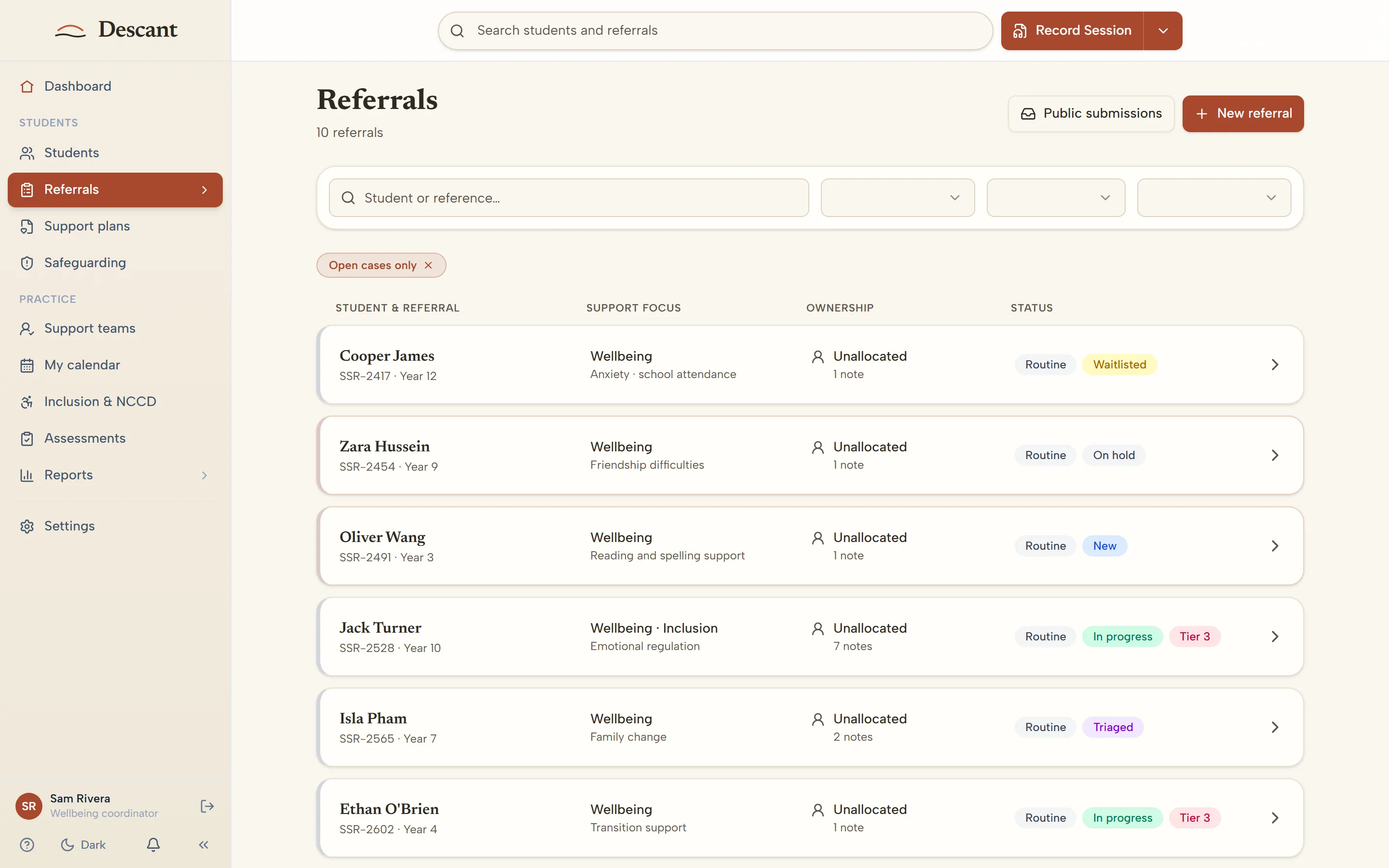
In a busy school, referrals can pile up quickly. Every new referral lands in a review queue, where a member of the team triages it:
- Urgency — every referral is marked routine, soon, urgent or crisis, so urgent concerns stand out
- Merge duplicates — when two people refer the same student about the same concern, the referrals can be merged rather than handled twice
- Close with a reason — a referral that does not need ongoing support is closed, and the reason is recorded
- MTSS tier — the team records the student's support tier, and every change to it is kept in the tier history
Once triaged, a referral is either allocated to a staff member or placed on the waitlist with a reason. To help with allocation, Descant suggests a staff member based on the area of support, the student's year level and who currently has the lowest caseload. The suggestion is a starting point — the person allocating confirms it or chooses someone else.
When a closed case needs support again, it can be reopened as a new episode linked to the last one, so the history is there from the start rather than rebuilt from memory.
Every referral keeps a dated record from submission through to closure, so concerns are not left sitting in an inbox.
Digital Parent Consent Workflows
Paper consent forms are one of the most persistent pain points in school wellbeing work. A counsellor identifies that a student needs support, sends a consent form home in the student's bag, and waits. The form may come back signed in a week, or it may never come back at all. Meanwhile, the counsellor has no visibility into whether the parent even received the form.
Descant can replace this with digital consent. Staff send a consent link to a parent or carer by email. The guardian opens it on their own device, reads the form, and signs with a typed-name declaration. The signed consent is saved as a PDF on the student's record. Consent can be sent to more than one guardian, and each signs for themselves.
Digital consent is switched on for each school when it is needed — it is off by default, so schools that already have a consent process they are happy with can keep it.
For more detail, see School Consent Forms: Digital Signing and State-by-State Compliance.
NCCD Evidence Collection Built Into the Workflow
The Nationally Consistent Collection of Data on School Students with Disability (NCCD) requires schools to demonstrate the adjustments they provide to students with disability. For many schools, this means a frantic period of evidence gathering each year, pulling together emails, meeting notes, and intervention records from multiple sources.
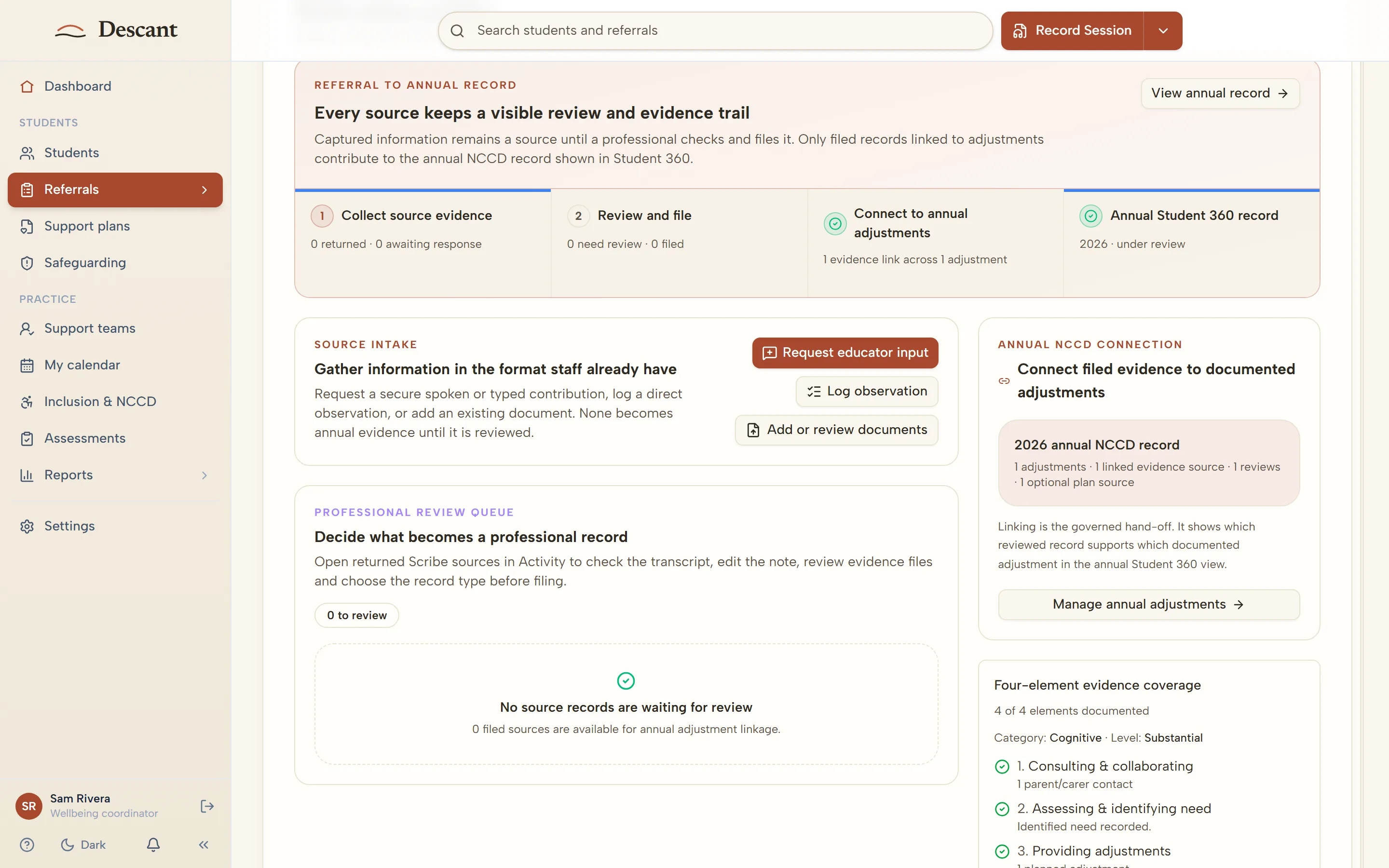
The Student Support Platform makes evidence collection part of everyday work, with a deliberate check. A case note does not become NCCD evidence automatically. The case lead nominates the note as evidence, and where the school has a line manager, the line manager approves it. Evidence is gathered through the year by the people who know the student, and checked before it counts.
Support plans on the student's case hold the goals, term progress and reasonable adjustments that the evidence relates to. At reporting time, the team can produce an NCCD evidence pack for each student's case as a PDF.
This does not replace professional judgement about NCCD categorisation. It ensures that the evidence to support those judgements is already organised and accessible when needed.
Mandatory Reporting Records and Follow-Up Tracking
Every Australian state and territory has mandatory reporting obligations for professionals who work with children. School counsellors, psychologists, teachers, and wellbeing officers are all mandated reporters in most jurisdictions.
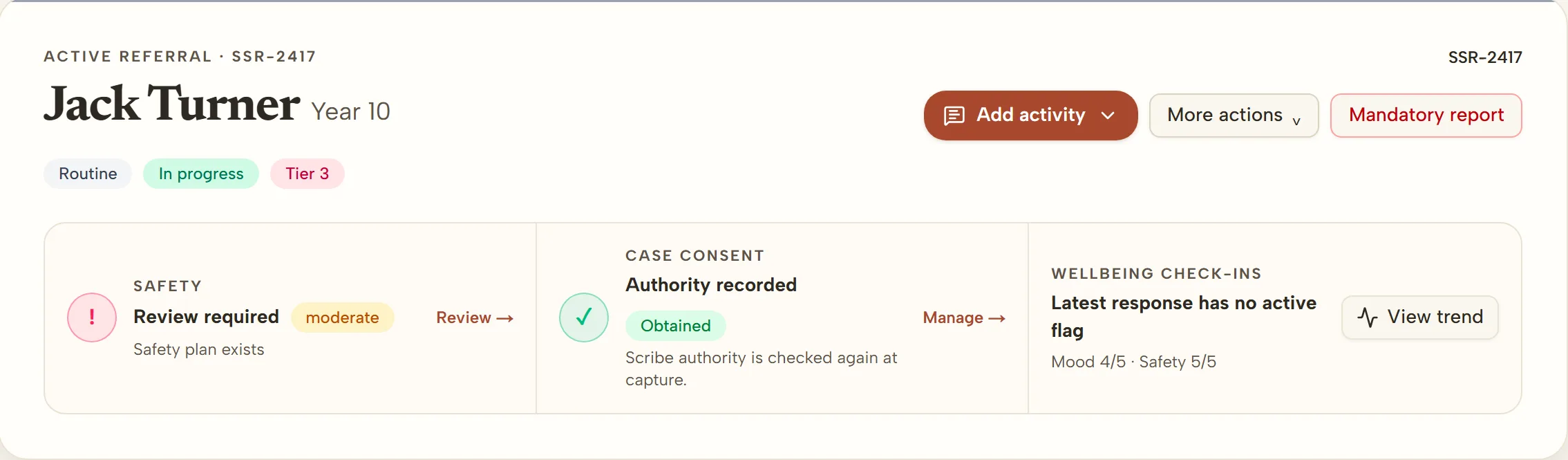
The platform includes a structured mandatory reporting record. When a staff member makes a report to the relevant authority, they record it on the student's case, and the report is tracked from there, so follow-up is visible to the people responsible for it.
The report sits on the student's case alongside the rest of their support record, so the team has the full context when it matters.
SST Meeting Coordination
Student Support Team (SST) meetings are a cornerstone of multi-disciplinary student support. They bring together the professionals involved with a student to review progress, adjust interventions, and plan next steps.
The platform supports six meeting types, including SSG, case conference and IEP review meetings. For each meeting, you record who attended and the actions agreed, each with an owner and a due date.
Before the meeting, you can generate an agenda from the student's case. It brings in the student's support tier, the concerns raised, the interventions in place and any actions still open from last time. It deliberately leaves out case notes, so the agenda can be shared with everyone in the room without exposing confidential detail.
Meeting records are linked to the student's support history, so the context of previous meetings, referrals, and plans is available to the people working on the case.
Referrals from Staff, Families and Students
Not every referral originates from within the wellbeing team. Teachers notice classroom behaviour changes. Year-level coordinators identify attendance patterns. Parents have concerns they want to raise directly.
Staff refer from the educator portal, signing in the same way as the rest of the school team. Each school also has a secure referral form for parents and carers, and for students themselves, that needs no sign-in. The referrer describes the concern, chooses the areas of support involved and says how soon support is needed, then confirms their email address with a one-time code sent to it. Confirmed referrals go into the team's review queue for triage.
This removes the friction of referral by email or paper form and helps make sure every concern is captured in the system from the moment it is raised.
Student Check-Ins
Students can check in through a secure link. A check-in that needs attention — for example, when a student says they want to talk, or rates their mood or safety low — is flagged and waits in a queue for the support team. Flags follow simple rules set out in advance; no AI decides which students are flagged.
The "wants to talk" queue means a student who has asked to speak to someone is visible to the team, rather than lost between classes.
Reports and Analytics for School Leadership
School leaders need visibility into student support activity without being drawn into individual case details. The Reports page includes a leadership briefing with headline figures, monthly trends, areas of support, year-level patterns, closure outcomes and support tier distribution, over a date range you choose, alongside a view of staff caseloads.
The briefing can be downloaded as a PDF, CSV, spreadsheet or meeting brief. Downloads are de-identified, with small numbers suppressed, and downloading needs the line-manager role. The Reports page also includes an early-warning list and a list of outstanding meeting and family follow-up actions (both name students, for the support team to act on).
These reports help leadership teams make informed decisions about staffing, resource allocation, and professional development. They also support compliance reporting and accreditation requirements. See Leadership Analytics for School Leaders for more.
Why This Differs From SIS Wellbeing Modules
Many Student Information Systems offer a "wellbeing" module. These modules are typically designed for incident logging — recording behavioural incidents, detentions, suspensions, and positive recognition events. They serve an administrative purpose and they do it well.
However, incident logging is not the same as case management. A wellbeing module in a SIS does not usually support referral triage, structured case documentation, consent workflows, NCCD evidence assembly, or multi-disciplinary team coordination. These are specialist workflows that require purpose-built tools.
The Student Support Platform is designed to sit alongside your existing SIS, not replace it. Attendance, academic results, and enrolment data remain in your SIS. Referrals, case notes, support plans and evidence live in the Student Support Platform, where they can be managed with the depth and structure that wellbeing work demands.
Pricing
The Student Support Platform is available to Australian schools on a straightforward pricing model:
- School fee: Current Descant pricing and offer dates are published on the pricing page.
- Per-seat AI Scribe access is available for staff who want AI-assisted drafting of their case notes and reports. Seats come in four levels — Plus ($19 a month), Core ($39), Pro ($69) and Max ($99), plus GST — and we set the seat levels with the school.
- School seat-volume discounts apply to optional Scribe seats: 5% for 5 to 10 seats and 10% for 11 or more. They never reduce the workspace fee.
Schools can start with the School Workspace alone and add AI Scribe seats as needed. Universities
and unusually large institutional deployments are scoped separately around the support service
rather than total enrolment.
Getting Started
Visit For Schools to learn more about how the Student Support Platform works for your school, or get in touch to arrange a walkthrough with our team.
Australian schools deserve student support tools built for the way wellbeing teams actually work — not administrative systems with a wellbeing tab bolted on. That is what we have built.